
🎯 Automate Customer Sentiment Tracking and Escalation
— A Plug-and-Play n8n Template to Protect Your Brand and Delight Your Customers
🧨 Problem
Most businesses don’t realize there’s a problem until a customer leaves a 1-star review or churns. Support teams are overloaded, and messages fall through the cracks—especially the angry ones.
Manually checking every conversation isn’t scalable. Critical feedback gets buried. And by the time you notice, the damage is done.
🛠️ Solution
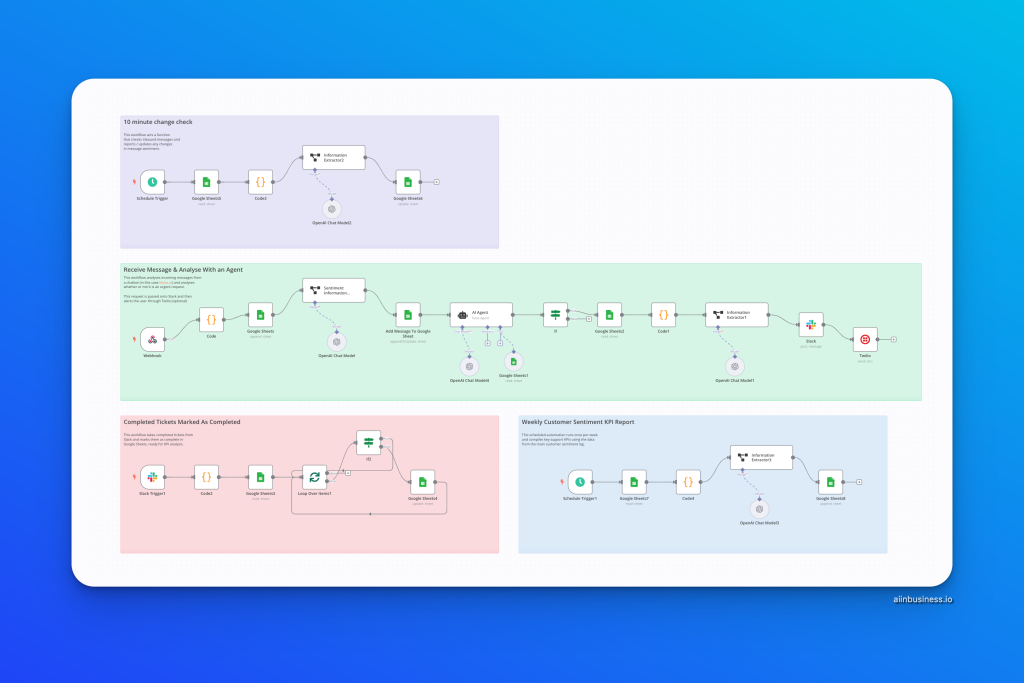
This n8n workflow listens to incoming customer messages, analyzes their tone using AI, tracks the full conversation thread, and automatically flags deteriorating sentiment. If needed, it escalates the case to Slack and even sends an SMS alert via Twilio.
It also builds a weekly KPI report using your data in Google Sheets, giving you a high-level overview of customer service performance.
✅ Benefit
- 🚨 Never miss an upset customer again
- 📈 Gain clarity into support performance and team responsiveness
- 🤖 Automate sentiment checks and escalation—no code needed
- 🔁 Run this every 10 minutes on autopilot
- 📊 Weekly KPI dashboards, AI-generated summaries, and performance trends
📦 Instructions
1. Import the Template
- Open your n8n dashboard.
- Click “Import” and upload the .json file.
2. Connect Your Tools
- 🔗 Google Sheets: Add your credentials and update the sheet/document ID in all relevant nodes.
- 💬 Slack (optional): Connect your workspace and set the target channel for alerts.
- 📱 Twilio (optional): Add your Twilio credentials and update the phone numbers to receive urgent case alerts.
3. Configure Webhooks and Schedulers
- Update the webhook path to your source (e.g., chatbot, frontend).
- The scheduled triggers are set to run:
- Every 10 minutes to scan new messages.
- Weekly to compile a customer sentiment KPI report.
- Every 10 minutes to scan new messages.
4. Plug in Your AI
- The template uses OpenAI (via LangChain) to:
- Detect sentiment.
- Summarize messages.
- Decide if escalation is needed.
- Detect sentiment.
- Add your OpenAI API credentials where required.
5. Run a Test
- Send a test message through the webhook.
- Check if the sentiment is logged and see if an alert is triggered based on message tone.
💬 CTA
Need help setting it up?
Use the AI chatbot at aiinbusiness.io – it’ll walk you through every step of the process and answer any questions you have.