
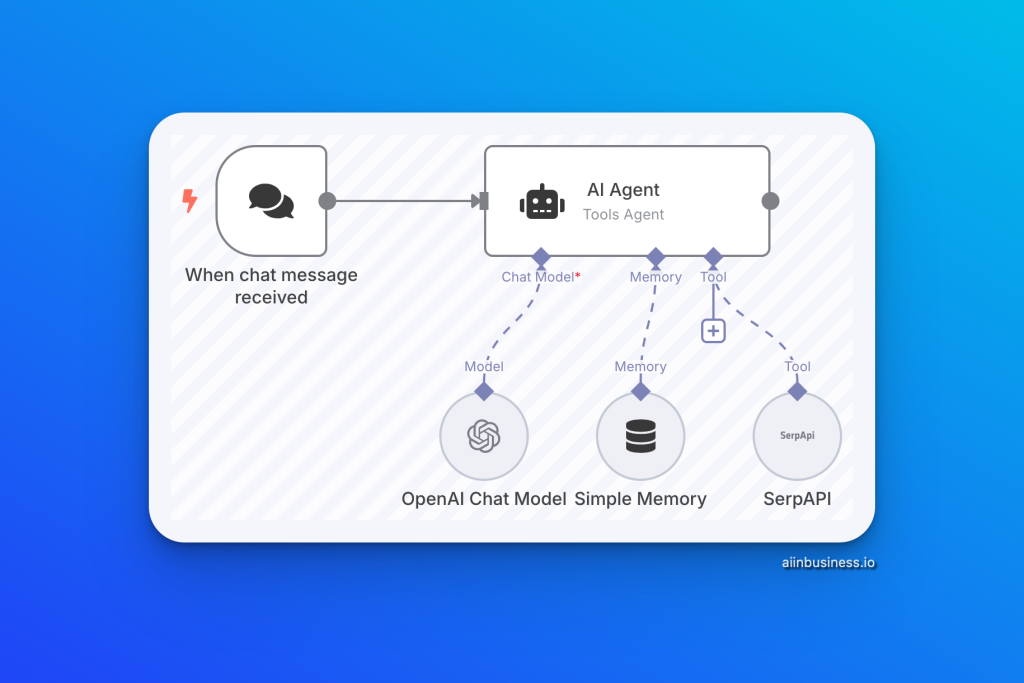
✅ How This Workflow Can Help You: Automating Smart Conversations for Your SaaS Company
Running a SaaS company means constantly handling customer queries, troubleshooting issues, and providing product information. This workflow allows you to automate customer support interactions, enhance user satisfaction, and save valuable time—all without compromising the quality of responses.
Imagine a smart conversational agent that not only understands user questions but also fetches real-time information from the web and remembers the context of past interactions. That’s exactly what this workflow achieves using OpenAI’s language models and SerpAPI.
🔄 What This Workflow Does
This workflow is designed to:
- Provide Instant Support: Instantly answer user questions using OpenAI’s language model.
- Fetch Real-Time Information: Use SerpAPI to gather the latest data when needed.
- Maintain Conversation Context: Ensure seamless interactions through memory buffers.
🔹 How It Works
- User Interaction (Manual Trigger)
- The conversation starts when a user initiates a chat.
- The workflow is designed to respond only upon request, keeping it efficient and user-friendly.
🔹 AI-Powered Response Handling (OpenAI Integration)
- HTTP Request (OpenAI API):
- Processes user input and generates coherent, helpful responses.
- Perfect for answering FAQs, guiding users through troubleshooting steps, and suggesting best practices.
- Example Use Case:
- User: “How do I integrate your software with WordPress?”
- Chatbot: “To integrate with WordPress, you need to install our plugin. Would you like me to guide you through the process?”
🔹 Fetching Real-Time Information (SerpAPI Integration)
- HTTP Request (SerpAPI):
- Retrieves up-to-date information from the web when the AI cannot respond based on pre-existing knowledge.
- Example Use Case:
- User: “What’s the latest update for Python 3.11?”
- Chatbot: “Let me check that for you…” (Uses SerpAPI to fetch current information).
🔹 Maintaining Context (Memory Buffer Handling)
- Contextual Memory:
- Tracks ongoing conversation context to ensure relevant responses throughout the interaction.
- Makes the chatbot feel more natural and human-like, improving user experience.
- Example Use Case:
- User: “Tell me about your pricing plans.”
- Chatbot: “We offer three plans: Basic, Pro, and Enterprise. Would you like me to help you choose the best one for your needs?”
- User: “Yes, please.”
- Chatbot: “Great! Can you tell me what features are most important to you?”
🌐 Why It’s Beneficial For You:
- Reduce Response Time: Instantly handle repetitive queries and troubleshooting guides.
- Provide Accurate Information: Use real-time search capabilities when existing data is insufficient.
- Deliver Better User Experience: Maintain conversation flow with memory buffer handling, making interactions feel natural.