
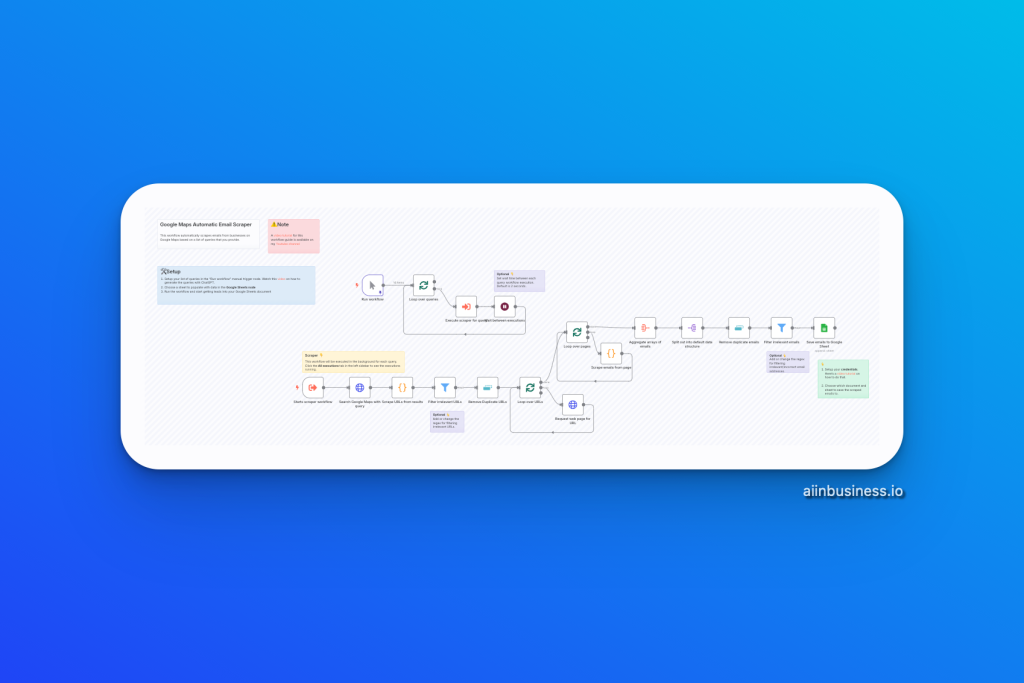
If you’re in sales, marketing, or business development, this workflow is a game-changer. It helps you automate lead generation by scraping real business emails from Google Maps—without using any third-party APIs or paid tools.
That means:
- No expensive email tools
- No monthly scraping fees
- Just a self-contained, free system using n8n’s core nodes
Whether you’re a freelancer, agency owner, or small business operator, you’ll get a steady stream of leads ready for outreach—automatically saved to Google Sheets.
📺 Watch the video tutorial here
🔄 What This Workflow Does
This workflow automates the process of:
- Generating targeted Google Maps queries
- Scraping URLs from business listings
- Visiting those websites and pulling out real email addresses
- Saving the results to Google Sheets—ready for email outreach
All of this runs inside n8n—no external scraping tools or hidden costs.
🔹 How It Works
1. Input Your Search Queries
- You enter business types and locations (e.g., “Dentists in Chicago”).
- These queries define who you’re targeting.
2. Iterate Through Each Query
- The workflow loops through each query one at a time.
- For every query, it triggers a sub-workflow to do the scraping.
3. Scrape Google Maps for Business URLs
- n8n scrapes search results directly from Google Maps.
- It collects URLs of business websites matching your criteria.
4. Fetch the Website Content
- Each business URL is opened.
- The workflow fetches the raw HTML content of the site.
5. Extract Email Addresses
- A Code Node runs custom JavaScript using RegEx.
- It pulls out any valid business emails found in the HTML.
6. Save the Leads to Google Sheets
- All the scraped emails and business info are logged into your Google Sheet.
- The sheet grows as the workflow runs—no manual input needed.
🔧 Setup Instructions
- Add Your Queries
- Open the “Run Workflow” node.
- Add a list of keywords and regions you want to target (e.g., “lawyers new york”).
- Connect Google Sheets
- Select your spreadsheet and target sheet in the Google Sheets node.
- This is where all email results will be saved.
- Run the Workflow
- Hit “Test Workflow” and watch it populate your sheet with fresh, verified emails.
🌟 Why This Workflow Is Valuable for You
- 🔄 Fully Automated – Set it up once and let it run in the background.
- 💸 Zero Extra Cost – Uses only n8n core nodes—no paid APIs or scrapers.
- 🎯 Hyper-Targeted Leads – You control the search queries for precision outreach.
- 🧰 Great for All Sizes – Whether you’re a solopreneur or part of a team, this tool scales with you.